

Replacements
The replacement function is designed to improve search results by modifying the default search output. This is achieved by replacing a user-entered search term (A) with a more relevant term (B) based on specific settings.
Replacements can involve:
- Substituting one word with another.
- Restricting the search to specific categories to avoid incorrect results.
- Managing ambiguous terms in shops with a wide range of products.
Multiple settings can be combined to fine-tune search behavior.
Configuration Options
Search Term
- The term for which the replacement should apply.
- Can be a single word or multiple words.
- Umlauts (ä, ö, ü) should be entered correctly instead of using “ae”, “oe”, or “ue”.
Replacement
- Defines the actual term that should be searched instead.
- Used when a search term does not exist in product data, ensuring users find relevant results.
Example:
| Search Term | Replacement |
|---|---|
| Garden Lamp | Outdoor Light |
If the replacement includes a category or product group, the search will be restricted to that category.
Example:
| Search Term | Replacement | Category |
|---|---|---|
| Ski Jacket | Ski Jacket (Same Term) | Ski Clothing |
This ensures that only ski jackets are shown within the Ski Clothing category, instead of displaying all products in that category.
Special Settings
Blacklist Entry
- Prevents any search from being executed for the given term.
- Forces a zero-result page.
- Used when a term could lead to misleading or unwanted results.
Example:
If a brand named “Power Training” exists, searching for it may also return generic fitness devices due to the words “Power” and “Training” appearing in other products. To prevent this, “Power Training” can be blacklisted, ensuring no unintended results appear.
Strict Mode
Enables precise control over when a replacement is triggered.
| Setting | Behavior |
|---|---|
| Enabled | The replacement applies only when the exact search term is used. |
| Disabled | The replacement applies even if the term is part of a longer search query. |
Examples
| Search Term | Strict Mode? | Search Query | Replacement Applied? |
|---|---|---|---|
| Shirt | ✅ Yes | red shirt | ❌ No |
| red shirt | ❌ No | red shirt men | ✅ Yes |
Whole Word Matching
Determines whether the replacement applies only to full words or also within compound words.
This feature is relevant primarily for languages with compound words, such as German or Dutch. In English, this setting typically has no effect.
| Setting | Behavior |
|---|---|
| Enabled | Applies only if the exact word is found. |
| Disabled | Applies even inside compound words. |
No Stemming
Determines whether word stems are considered.
| Setting | Behavior |
|---|---|
| Enabled | Replacement applies only to exact word matches. |
| Disabled | Replacement applies even if word stems match (e.g., singular/plural). |
Examples
| Search Term | No Stemming? | Search Query | Replacement Applied? |
|---|---|---|---|
| Wheel | ✅ Yes | Bicycle 21 wheels | ❌ No |
| Bed | ❌ No | Beds | ✅ Yes |
Replacement Types
| Type | Behavior |
|---|---|
| replace | A is completely replaced by B. |
| add | B is added to A. Sorting is done across both results. |
| addAndPrefer | B is added, but results from B appear first. |
| prefer | A remains unchanged, but products also found in B are ranked higher. |
| preferWithSort | Like “prefer”, but results from B maintain their own sorting. |
| penalize | A remains unchanged, but products also found in B are ranked lower. |
| delete | A remains unchanged, but products from B are completely removed. |
Filters
Filters refine search results before applying a replacement.
Example:
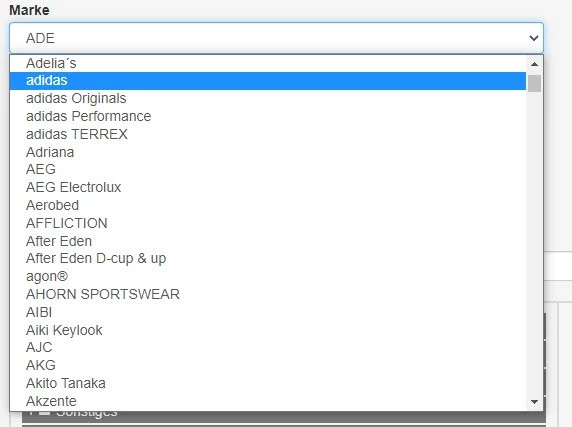
Expanded filter selection:
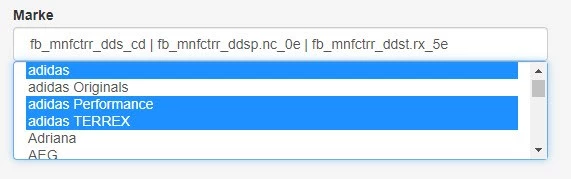
Specific Filter Options
| Filter | Behavior | |
|---|---|---|
| Search Color | Limits results to items with a selected color. | |
| Size | Limits results to items with a selected size. | |
| Target Audience (“for whom?”) | Limits results to specific groups (e.g., men, women, children). | |
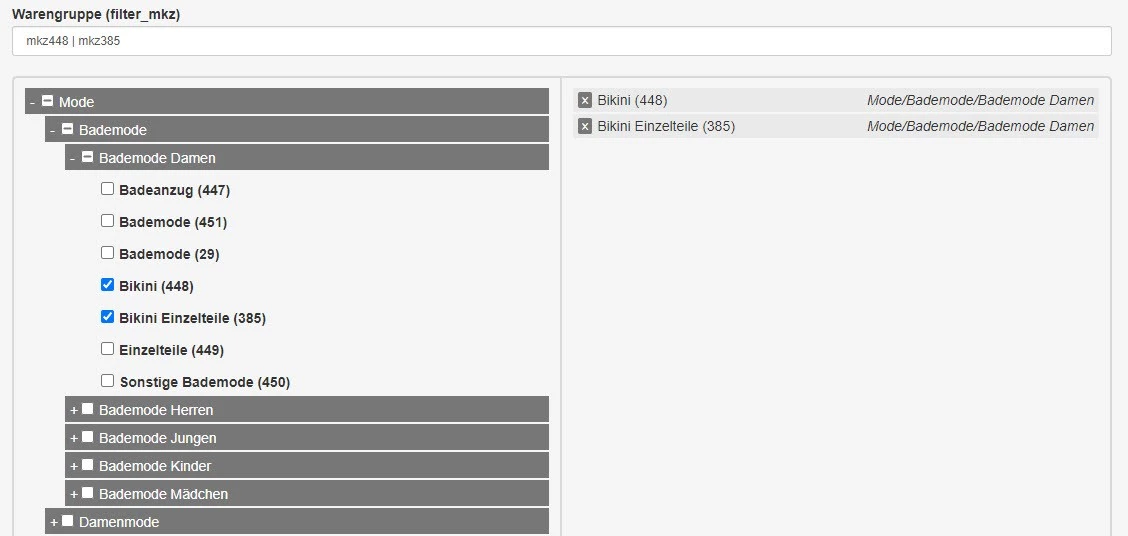
| Category | Restricts search to specific categories (separated by pipes ` | `). There is the possibility to have unlimited categories, but this will make the search slower. In extreme cases, this could lead to a timeout. This is why it is preferred to limit the categories, or even choose an upper category. |
| Brand | Limits results to selected brands. | |
| Price (Min) | Shows only products above a set price (±1 EUR tolerance). | |
| Price (Max) | Shows only products below a set price. | |
| Discounted Items | Allows filtering only discounted or only non-discounted products. | |
| CutOff Limit (Min/Max) | Adjusts minimum or maximum search result relevance thresholds. More information about the CutOff limit | |
| Product Group | Restricts search to selected product groups (separated by pipes ` | `). |
Size Recognition
To correctly interpret sizes in search queries, additional settings can be configured.
| Size Type | Examples |
|---|---|
| Surface Measurement (100x200 cm) | Bedding, Furniture |
| Length Measurement (160 cm / 22 inches) | Curtain Rods, Bicycles |
| TV Size (cm & inches) | TVs, Monitors |
| Surface Measurement in Two Filters | Products with height & width (e.g., rugs) |
Two-Size Filter Handling
- Enabled (“true”): Searching for “Bedding 155 cm” will find both “155x200 cm” and “155x220 cm”.
- Disabled (“false”): Searching for “Bedding 155 cm” treats “155” as a single number, not a size.
Testing and Saving Replacements
| Action | Description |
|---|---|
| Save | Saves all current settings. A comment dialog opens to document the change. Comments help ensure adjustments remain traceable over time. |
| Cancel | Discards new or modified settings. |
| Test | Opens a new tab with the search result for the current configuration and query. Does not trigger a save. |
Multi-Tenant Support
If multiple tenants (shops) are configured on the search server, replacements can be applied to one or more tenants simultaneously.
After creation, the selection can be modified as needed.