

Import/Export Function
Elements and Their Functions
| Element | Description |
|---|---|
 | Clicking this button navigates to the import page for uploading a list. |
 | Clicking this button generates an export list and redirects to a page with further actions. The export list includes all tenants in the cluster (if multiple exist). |
 | Clicking this button generates an export list but only for the currently selected tenant. |
 | Clicking this button opens the browser’s download window directly. |
Export File Structure
Exported files generally follow a consistent format:
- Search terms that should trigger specific responses.
- Sequential numbering of entries.
- Additional columns based on configured values.
Columns after the sequential number can be left empty, as they are automatically populated during import. For the active/inactive column, the default value is “active”.
Commonly Exported and Imported Files
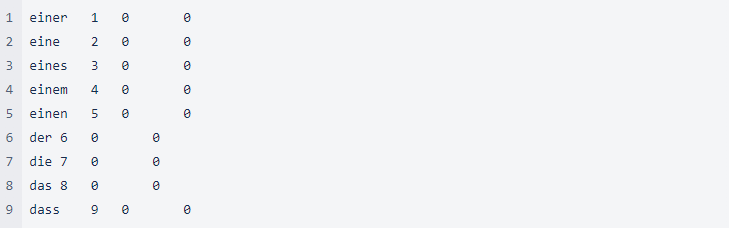
Stop Words
Defines words that should be ignored in search queries.
File Structure
- Values are tab-separated
- Column 1: Stop word
- Column 2: Sequential number (must be unique; best to continue the existing sequence)
- Column 3: Active status (0 = active, 1 = inactive)
- Column 4: Empty (always left blank)
- Column 5: Indicates manual or automatic management (always 0 = manual)
Synonyms
Defines word relationships for improved search matching.
Examples of Synonym Entries
| Example | Description |
|---|---|
raincoat<>windbreaker<>jacket<>parka<>anorak<>trench coat | Bidirectional synonyms (mutually interchangeable). Multiple terms can be included. If no penalty is set, the default “2.0” applies. |
dog bowl<>pet dish#0.0 | Bidirectional synonym with 0.0 malus (completely equal ranking). |
sneakers#running shoes#30.0 | Monodirectional synonym (only applies from “sneakers” → “running shoes”), with a 30.0 malus. |
File Structure
| Column | Description | Required | Data Type | Example |
|---|---|---|---|---|
| Column 1 | Words, including malus values if applicable. | Yes | String | outdoorhose<>trekkinghose, boot#shoe#30 |
| Column 2 | Sequential number. | Yes | Integer | 13 |
| Column 3 | Active status (0 = active, 1 = inactive). | Yes | Integer | 0 |
| Column 4 | Empty (always left blank). | No | – | |
| Column 5 | Indicates manual or automatic management (0 = manual, always). | Yes | Integer | 0 |

Direct Links
Allows redirecting search terms to specific pages instead of performing a search.
Examples of Direct Link Entries
| Search Terms | Destination | Type |
|---|---|---|
job application, careers, job offers, training | https://jobs.tenant-group.com/ | external-link |
wishlist | /my-account/my-wishlist | link |
car service | /sale/technology-leisure/hardware/car-accessories/ | link |
flat rate, shipping cost, shipping flat, vkp flat, shipping package | /p/shipping-cost-flat-rate/AKLBB408934238 | link |
File Structure
| Column | Description | Required | Data Type | Example |
|---|---|---|---|---|
| Column 1 | Stemmed words (automatically processed). Can be left empty. | No | String | blus |
| Column 2 | Search terms that trigger the direct link (comma-separated). | Yes | String | hemd, bluse |
| Column 3 | Destination URL. | Yes | URL | /shirts/longsleeve |
| Column 4 | Link type (link, external-link, etc.). | Yes | String | link |
| Column 5 | Verification term (optional; checks if this word appears on the target page). Can be left empty. | No | String | Shirts |
| Column 6 | Sequential number. | Yes | Integer | 42 |
| Column 7 | Active status (0 = active, 1 = inactive). | Yes | Integer | 0 |
| Column 8 | Empty (always left blank). | No | – | |
| Column 9 | Indicates manual or automatic management (0 = manual, always). | Yes | Integer | 0 |
Special Word Stems
Defines exceptions for stemming rules, preventing incorrect word reductions.
File Structure
| Column | Description |
|---|---|
| Column 1 | Word that should not be automatically stemmed. |
| Column 2 | Correct base form of the word. |
| Column 3 | Sequential number. |
| Column 4 | Active status (0 = active, 1 = inactive). |
