

Storefront Content
The “Storefront” content type defines the first page visitors see when accessing the webshop URL (e.g., www.demo.com). The homepage serves multiple purposes: for visitors, it provides a first impression, source of information, and establishes trust, encouraging them to stay and explore the shop. CMS editors use it to manage editorial content and to communicate current offers to target audiences.
Special feature:
There can only be one Storefront page with the URL alias /storefront defined as the homepage. Editors may create and structure multiple pages of this content type in Drupal, but only one page can use the /storefront alias and will be displayed as the homepage.
Another special feature is the “App-Storefront” content type. With the alias /storefront-app, the homepage for the native shopping app is defined. Unlike the desktop/mobile homepage, the app homepage only supports selected paragraphs that are specifically assigned to this content type.
What can editors publish with this content type?
- The central homepage of the webshop for desktop/mobile
- The homepage for the native shopping app (App-Storefront)
- Target group-oriented content, current offers, campaigns, and recommendations
- Flexibly structured pages with individually selectable components
How to create new Storefront Content
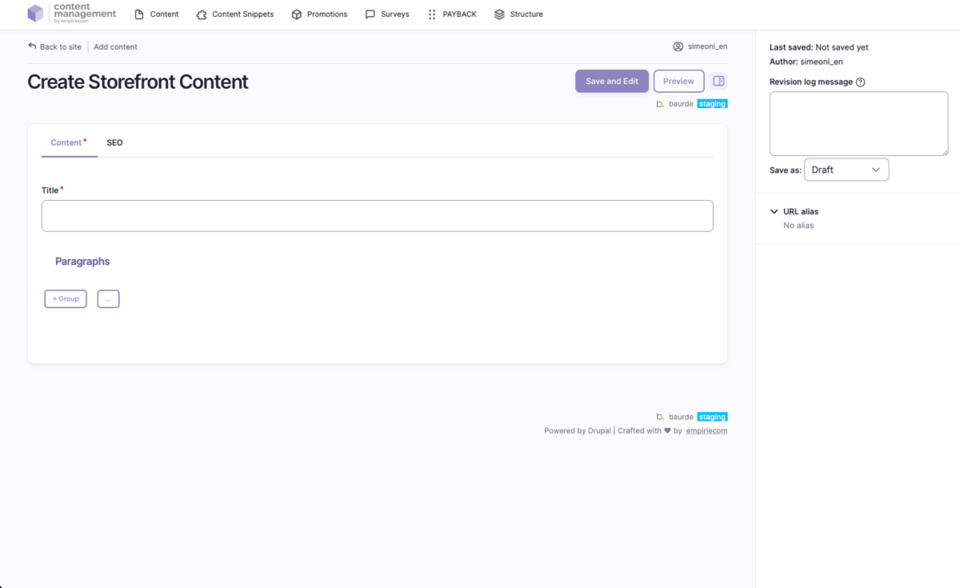
- In the top menu, open the second bar and select: Content → Add Content → Storefront Content.
- Drupal creates a new page with a unique ID of the type “Storefront Content”.
- Enter a name for the page in the mandatory “Title” field (e.g., “Homepage”, “Storefront App”).
- Assign the desired URL alias (
/storefrontfor the webshop homepage,/storefront-appfor the app homepage). Note: Only one page may use each alias! - Click “Save” at the bottom left to create the page; it will appear as an empty entry in the content overview and can then be further edited.
Fields and Options
| Field | Description |
|---|---|
Title | The name of the page (required). |
URL Alias | Determines whether the page acts as the central homepage (/storefront) or the app homepage (/storefront-app). |
ADD Paragraph | Add sections/building blocks; only selected paragraphs are available on the app homepage. Details about the paragraph blocks are described in a separate chapter. |
Save as | Set the status when saving: Draft, Published, or Unpublished. |
Publication Workflow
- When saving, select the desired status via “Save as” (Draft, Published, Unpublished).
- After the first save, the page appears in the content overview and can be further edited.
Technical Notes & Special Features
- Not all features and fields of paragraphs are supported for the App-Storefront. The image format “GIF” is not allowed in the App-Storefront.
- The URL is managed analogously to other pages in Drupal. Intershop URLs are no longer permitted.
- The App-Storefront can be maintained per brand as “Homepage App” or “Storefront App”.
- For testing in the beta app, a specific revision of the Storefront can be loaded (enter and activate the revision ID in the app).
- The old Storefront remains available in parallel and can be displayed in the app via a toggle.
Not covered on this page
- Detailed description of available paragraph blocks: see separate chapter.
- Image sizes and formats: documented separately.