

Product Listing Content
The “Product Listing Content” type is used to provide editorial CMS content specifically on product listing pages. It also allows you to place banners above and below the product listing.
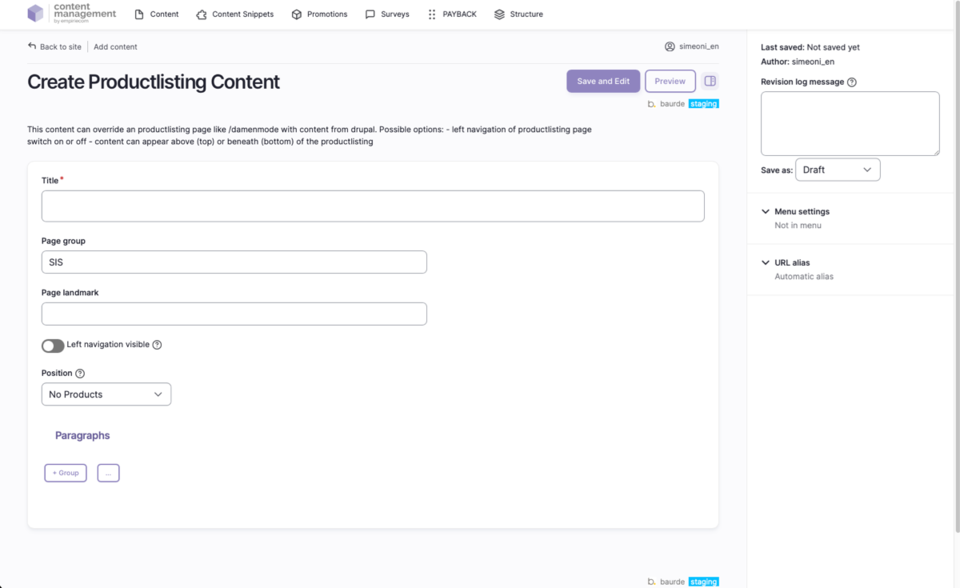
What can editors publish with this content type?
- Editorial introductions, notes, or campaign messages that appear directly on product listing pages (e.g., search result pages).
- Banners displayed above (“Top”) or below (“Bottom”) the product list.
- Optionally, pure CMS pages without a product list (“No Products”), if only editorial content is required.
How to create new Product Listing Content
- In the top menu, open the second bar and select: Content → Add Content → Productlisting Content.
- Drupal creates a new page with a unique ID of type “Productlisting Content”.
- Fill in the mandatory “Title” field to name the page.
- Click “Save” at the bottom left to create the page; it will appear as an empty entry in the content overview and can be edited further.
Fields and Options
| Field | Description |
|---|---|
Title | The name of the page (e.g., “Women’s Fashion” or “Technology”); this field is required. |
Page Group | The page type for statistics; always set to “SIS” for this content type. |
Left Navigation Visible | Optional: Determines whether the shop navigation is shown to the left of the content in the frontend. Editors can choose whether their content is displayed with or without the left shop navigation. |
Position | Controls where the CMS content appears relative to the product list: No Products (pure CMS page, no product list), Top (CMS content above the product list), Bottom (CMS content below the product list). |
ADD Paragraph | Add sections/building blocks; available paragraphs are identical on all pages. Details on paragraph blocks are described in a separate chapter. |
Save as | Set the status when saving: Draft, Published, or Unpublished. |
Publication Workflow
- When saving, select the desired status via “Save as” (Draft, Published, Unpublished).
- After the first save, the page appears in the content overview and can be edited further.
Not covered on this page
- Page Landmark: currently without further description and will be expanded in the future; ignore for now.
- Image sizes and formats: documented separately.
- Detailed description of paragraph blocks: see separate chapter.