

Paragraph From Library
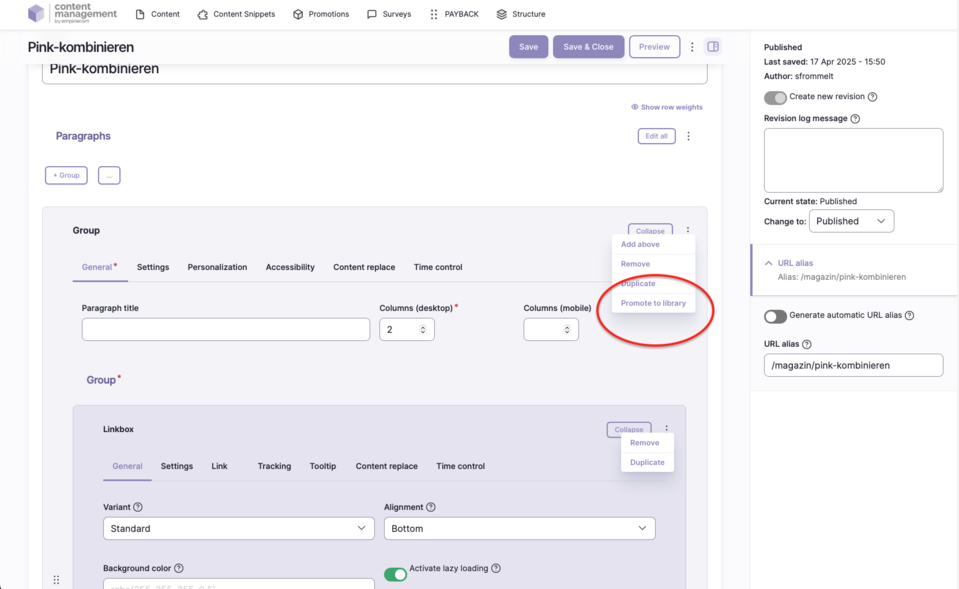
The “From Library” paragraph enables editors to reuse already existing content from a central library at any location in the CMS. Editors can select existing paragraphs or content and embed them into pages without having to create them again. This ensures consistent use of content and reduces maintenance effort, as changes only need to be made once and are automatically applied everywhere the content is used.
Features & Benefits
- Reuse of previously created paragraphs or layout sets from a central library
- Consistent presentation and maintenance of content
- Changes to a library paragraph are automatically applied to all embedded locations
- Editors can create and manage their own template sets
Backend Configuration
Steps
- Create ContentType.
- Insert the “From Library” paragraph.
- In the “Reusable paragraph” field, type the name of the desired saved paragraph from the library.
Managing the Library
- Create a new template set: Configure a paragraph as usual and then click on the three dots on the right (“PROMOTE TO LIBRARY”) to add it to the library.
- The library can be maintained by editors and allows the definition of custom template sets.
General Configuration Options
| Field | Description |
|---|---|
Spacing Type | none | page width | page width but with some left/right spacing on mobile | window width |
Alignment | None/Standard | Left | Center | Right |
Vertical Alignment | None | Top (flex-start) | Bottom (flex-end) | Stretched (stretch) | Top | Center | Bottom |
Link | Target (_self, _blank), bonus number, anchor, highlight, search filter |
Tracking | Campaign ID, type, category, detail, name |
Tooltip | Activate/deactivate tooltip, position, promotion text or content snippet |
Personalization | Display for specific user groups (anonymous, logged-in customers, bonus program, credit affinity) |
Accessibility | Activate skip link, freely nameable |
Replace Content | Content can be dynamically replaced using Dynamic Yield ID |
Time Control | Control visibility of the paragraph by time (from/until) |