

Paragraph Group
The “Group” paragraph is used to flexibly structure CMS pages. With “Group”, editors can arrange content in different column variants, define spacing and alignment, and include time-controlled content. Nesting of groups is possible, but should be used sparingly and without complex constructions.
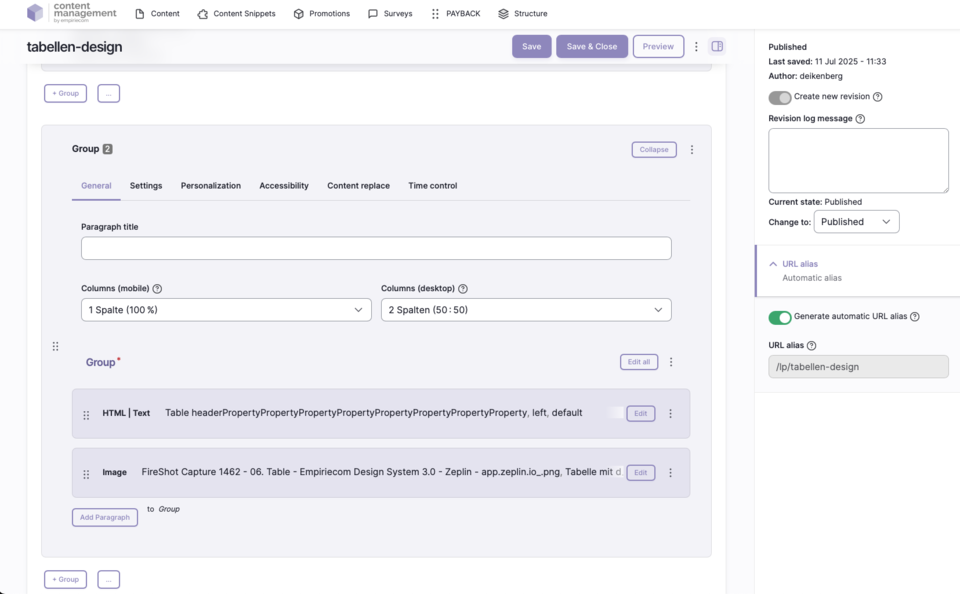
Features & Benefits
- Structure content in flexible column variants (1–6 columns possible)
- Different column layouts for desktop and mobile
- Individual spacing and alignment
- Time-controlled visibility of groups
- Nesting of groups is possible (but avoid overly complex structures)
- Uniform maintenance and clarity through group names in edit mode
- Do not mix “Group” and “Group Veraltet” within a single page
Possible Column Variants
| Columns Mobile | Columns Desktop |
|---|---|
| 1 column (100 %) (standard) | 1 column (100 %) (standard) |
| 2 columns (50 : 50) | 2 columns (50 : 50) |
| 2 columns (66 : 33) | 2 columns (66 : 33) |
| 2 columns (33 : 66) | 2 columns (33 : 66) |
| 3 columns (33 : 33 : 33) | 3 columns (33 : 33 : 33) |
| 3 columns (50 : 25 : 25) | 3 columns (50 : 25 : 25) |
| 3 columns (25 : 50 : 25) | 3 columns (25 : 50 : 25) |
| 3 columns (25 : 25 : 50) | 3 columns (25 : 25 : 50) |
| 4 columns (25 : 25 : 25 : 25) | 4 columns (25 : 25 : 25 : 25) |
| 5 columns (20 : 20 : 20 : 20 : 20) | 5 columns (20 : 20 : 20 : 20 : 20) |
| 6 columns (16.6 % each column) | 6 columns (16.6 % each column) |
Backend Configuration
Steps
- Create ContentType.
- Insert the “Group” paragraph.
- Select the number of columns for mobile and desktop.
- Make further settings such as spacing, alignment, and time control.
Usage Notes
General Configuration Options
| Field | Description |
|---|---|
Group Name | Internal label for better clarity in edit mode |
Mobile Columns | Number of columns for mobile view (if empty, desktop variant is used) |
Desktop Columns | Number of columns for desktop view |
Spacing Type | none | page width | page width with mobile spacing | window width |
Alignment | None/Standard | Left | Center | Right |
Vertical Alignment | None | Top (flex-start) | Bottom (flex-end) | Stretched (stretch) | Top | Center | Bottom |
Link | Target (_self, _blank), bonus number, anchor, highlight, search filter |
Tracking | Campaign ID, type, category, detail, name |
Tooltip | Activate/deactivate tooltip, position, promotion text or content snippet |
Personalization | Display for specific user groups (anonymous, logged-in customers, bonus program, credit affinity) |
Accessibility | Activate skip link, freely nameable |
Replace Content | Content can be dynamically replaced using Dynamic Yield ID |
Time Control | Control visibility of the group by time (from/until) |