

Paragraph HTML Editor
CKEditor is the rich text editor integrated into Drupal for creating and editing content. It offers editors a modern, clear user interface as well as essential features for text formatting, link and media management. The editor is part of Drupal Core and is maintained through regular core updates, thus meeting Drupal’s general security and maintenance standards. For developers, a well-structured API is available, allowing the editor to be extended and adapted to project-specific requirements, for example through custom plugins or contrib modules. CKEditor forms the technical foundation for visual content editing in current Drupal versions.
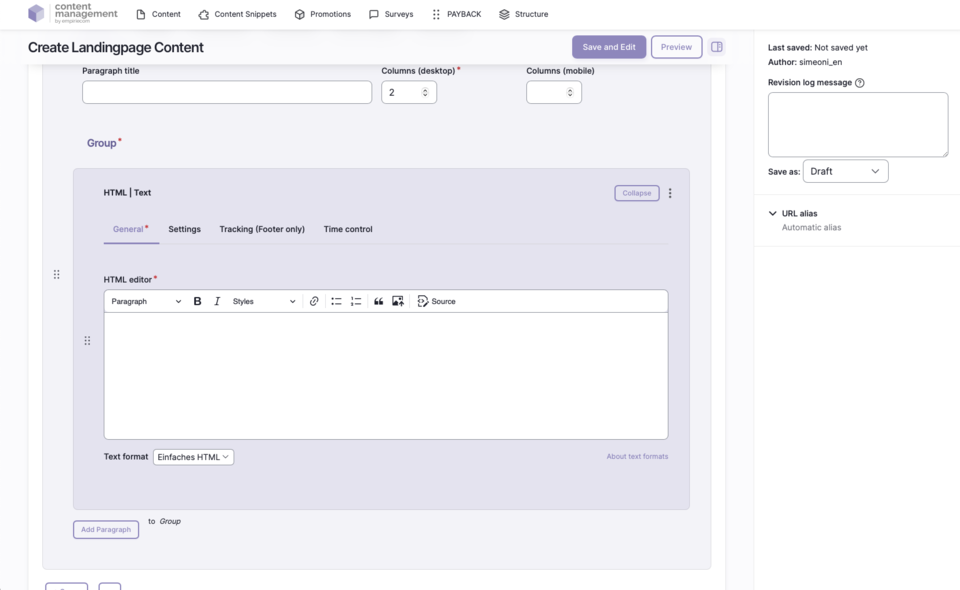
Features & Benefits
- Create and edit HTML text blocks directly in the CMS
- Convenient WYSIWYG editing thanks to CKEditor
- Source code mode for direct insertion and editing of HTML code
- Support for special characters and HTML elements
- Integration of buttons, e.g. for cookie consent (withdrawal of consent for specific cookie categories)
- Flexible formatting: headings, lists, links, images, tables
- Integration into all content areas of the page
Backend Configuration
Steps
- Create ContentType.
- Insert the “HTML Editor” paragraph.
- Enter the text block in the editor or edit HTML code in source code mode.
General Configuration Options
| Field | Description |
|---|---|
Editor Field | Input field for the HTML text block; editing in WYSIWYG mode or directly in source code |
Source Code Mode | Switch to direct editing of the HTML code |
Tracking | Campaign tracking, withdrawal buttons, etc. |
Personalization | Display for specific user groups (anonymous, logged-in customers, bonus program, credit affinity) |
Accessibility | Activate skip link, freely nameable |
Tooltip | Activate/deactivate tooltip, position, promotion text or content snippet |
Link | Target (_self, _blank), bonus number, anchor, highlight, search filter |
Time Control | Control visibility of the HTML block by time (from/until) |