

Paragraph Picture
The “Picture” paragraph allows editors to insert images or graphics into pages and content sections. It supports targeted delivery of different versions for desktop and mobile/app, ensuring the appropriate image format is displayed on every device. Editors retain full control over image selection and placement—for optimal presentation and performance.
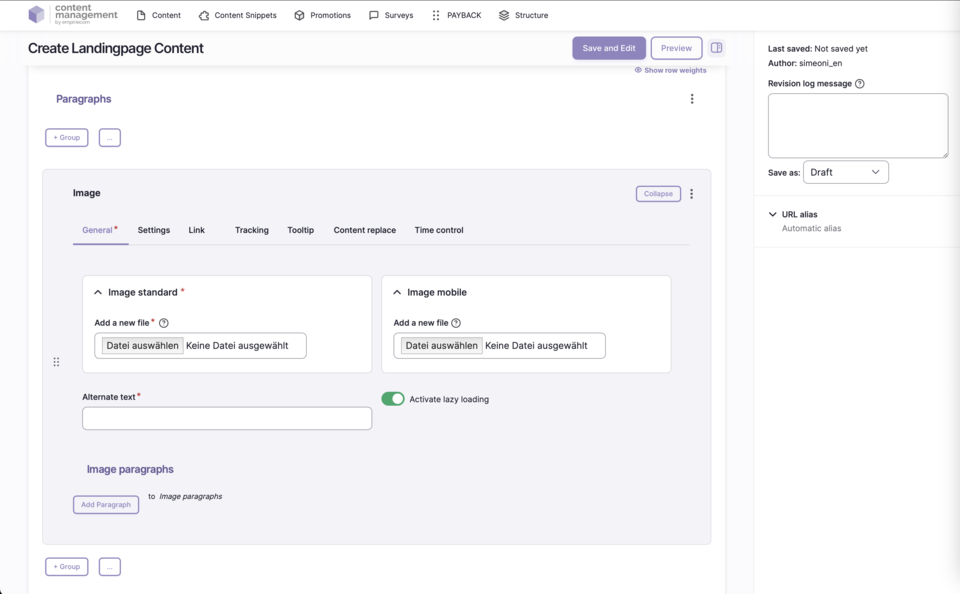
Features & Benefits
- Integration of images with different versions for desktop, tablet, and mobile
- Responsive image display depending on device
- Support for modern WebP format (automatic conversion)
- Option for lazy loading to optimize performance
- Full control over alt text and image title for SEO and accessibility
- No central image database—upload directly at the desired location
Backend Configuration
Steps
- Create ContentType.
- Insert the “Picture” paragraph.
- Upload image(s) in the desired fields and configure settings.
Notes on Image Preparation
Notes on Lazy Loading
General Configuration Options
| Field | Description |
|---|---|
Image - Standard | Use the “Select file” button to upload an image directly from your hard drive. |
Image - Tablet | Optional: image specifically for tablet—otherwise, the standard image is displayed. |
Image - Mobile | Optional: image specifically for mobile—otherwise, the standard image is displayed. |
Alternate Text | Image description for SEO and accessibility. |
Title | Additional text information for the image (appears as a tooltip layer on mouseover). |
Lazy loading | The image is only loaded while scrolling (performance optimization). |
| Field | Description |
|---|---|
Spacing Type | none | page width | page width with mobile spacing | window width |
Alignment | None/Standard | Left | Center | Right |
Vertical Alignment | None | Top (flex-start) | Bottom (flex-end) | Stretched (stretch) | Top | Center | Bottom |
Link | Target (_self, _blank), bonus number, anchor, highlight, search filter |
Tracking | Campaign ID, type, category, detail, name |
Tooltip | Activate/deactivate tooltip, position, promotion text or content snippet |
Personalization | Display for specific user groups (anonymous, logged-in customers, bonus program, credit affinity) |
Accessibility | Activate skip link, freely nameable |
Replace Content | Content can be dynamically replaced using Dynamic Yield ID |
Time Control | Control visibility of the image by time (from/until) |
Buttons & Actions
- Collapse: Collapse section
- Add above: Add new section above
- Remove: Delete section
- Duplicate: Duplicate section
- Add to library: Save section as template