

Content Snippets
Content Snippets in Drupal are reusable content elements that are centrally managed and can be embedded in multiple locations across a website. They are particularly suitable for service information on product detail pages (PDP), promotion banners, content banners, notifications, as well as various other frequently used texts and Drupal content. The main advantage is centralized maintenance: a change is automatically applied everywhere the snippet is used. This saves time, prevents inconsistencies, and ensures that important information is always up-to-date and consistent. In contrast to Drupal blocks, which are primarily designed for structural elements, Content Snippets focus on flexible reuse of content within pages.
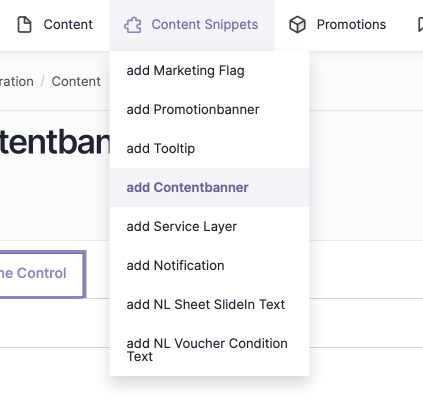
Use Cases for Content Snippets
- Service layer (product detail pages and checkout)
- Promotion banners (text/banner below navigation)
- Content banners (product list)
- Notifications (messages on checkout pages)
- Newsletter texts and voucher conditions (NL-Sheet, NL-Voucher-Conditions)
- Other frequently used texts (e.g., cookie notice, legal notice, privacy policy)
Management and Creation of Content Snippets
- Content Snippets are created and managed centrally in the CMS.
- Each snippet requires a unique ID (“tag” in Drupal) to be displayed at the desired location (article, page, category).
- The overview of all snippets can be found under “Content → Content Snippet Bundle”.
- New snippets can be created via “Add Content Snippet”.
Fields to Fill In When Creating a Snippet
| Field | Description |
|---|---|
Visible | Green dot: valid period. Red dot: period expired. |
Name | Name of the content snippet. |
Content Snippet Type | Select between Content Banner (MBA), Notifications (Checkout), Promotion Banner, Service Layer (DV). |
Status | Published or Unpublished. |
Start Date | The date from which the snippet is valid. |
End Date | The date from which the snippet is invalid. |
Author | Username of the creator. |
Translation Language | German, English, French. |
Action Links | Dropdown button for editing, cloning, translating, deleting. |
Modification Date | Last edit/change. |