

CS Contentbanner
The “Contentbanner” content snippet allows editorial content in the form of a banner to be specifically displayed above product lists or search results pages. Typical use cases include marketing campaigns such as SALE notices or seasonal campaigns that should be prominently displayed in the shop. A content banner can be assigned to specific product lists or automatically shown on the search results page based on defined search terms. The advantage lies in the simple, central configuration, which makes it possible to efficiently use a banner or CMS content across multiple product lists at once.
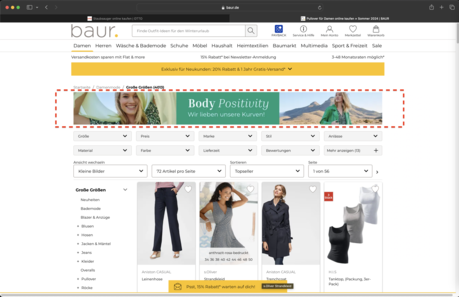
Use cases for the Contentbanner snippet
- Editorial banners for product lists and search results pages
- Marketing campaigns (e.g., SALE, seasonal campaigns)
- Targeted messaging by assigning to categories (assortment IDs) or search terms
Management and creation of the Contentbanner snippet
- Creation and maintenance centrally in the CMS as a separate content snippet
- Assignment to product lists by selecting assortment ID(s) or entering search terms (both can be combined)
- Overview of all content banner snippets in the section “Content → Content Snippet Bundle”
- New snippets can be created via “Add Content Snippet” and selecting “Contentbanner (MBA)”
- Existing content banner snippets can be cloned to quickly create new variants
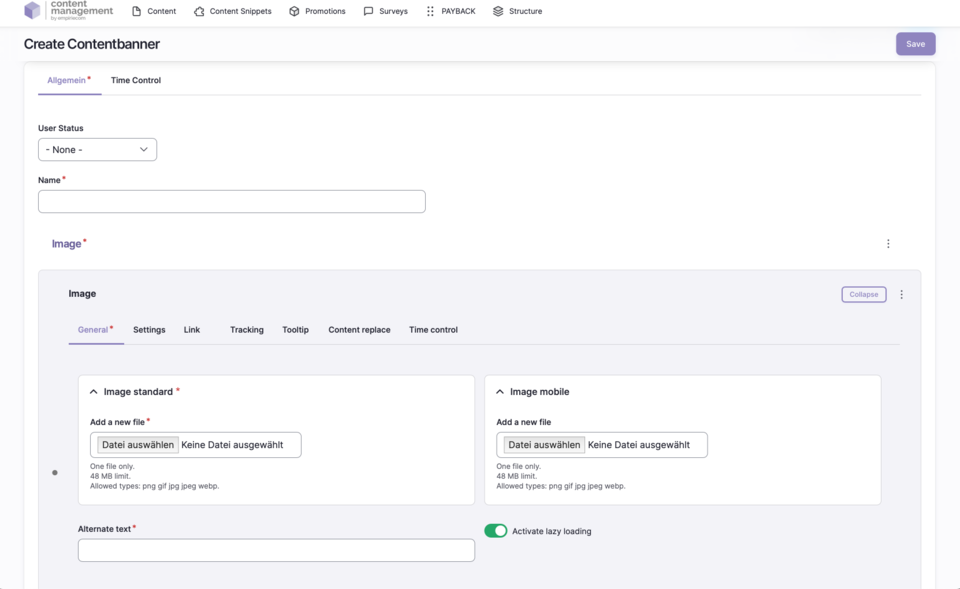
Fields to fill in when creating a Contentbanner snippet
| Field | Description |
|---|---|
Name | Name of the content snippet |
Image | Image for the banner (fill in all necessary fields as with the image paragraph) |
Assortment | Assortment ID(s) of the assigned category(ies) or search terms (separated by commas, e.g. 8394, fitnessgerät, crosstrainer) |
Status | Published = online, Unpublished = offline |
Revision Log | Message/note for creation, update, etc. |
User Status | Target group (e.g., logged-in customers, bonus program members, new customers) |
Start Date | Start of validity |
End Date | End of validity |
Author | Username of the creator |
Translation Language | German, English, French |
Action Links | Edit, Clone, Translate, Delete |
Modification Date | Last edit/change |