CS Promotions
The “Promotion” content snippet is used within the empiriecom Suite to specifically communicate customer benefits and support conversion in the checkout process. Typical content includes promotional statements such as percentage discounts or exclusive benefits for certain customer groups, such as app users. Editors can create different promotion variants in the CMS and display them at defined locations in the shop, as well as assign them to specific customer groups or marketing channels. The CMS serves exclusively as a host for the visible texts and messages; the actual promotion codes are created in upstream systems and only enriched with the corresponding content in the CMS.
Use cases for the Promotions snippet
- Communication of benefits, discounts, and promotions in the checkout or on product pages
- Targeted addressing of specific customer groups (e.g., new customers, bonus program, logged-in users)
- Display at defined shop positions or for specific categories (e.g., storefront, individual product categories)
- Integration of promotions via URL parameters (e.g., BonusNumber, promotional items)
Management and creation of the Promotions snippet
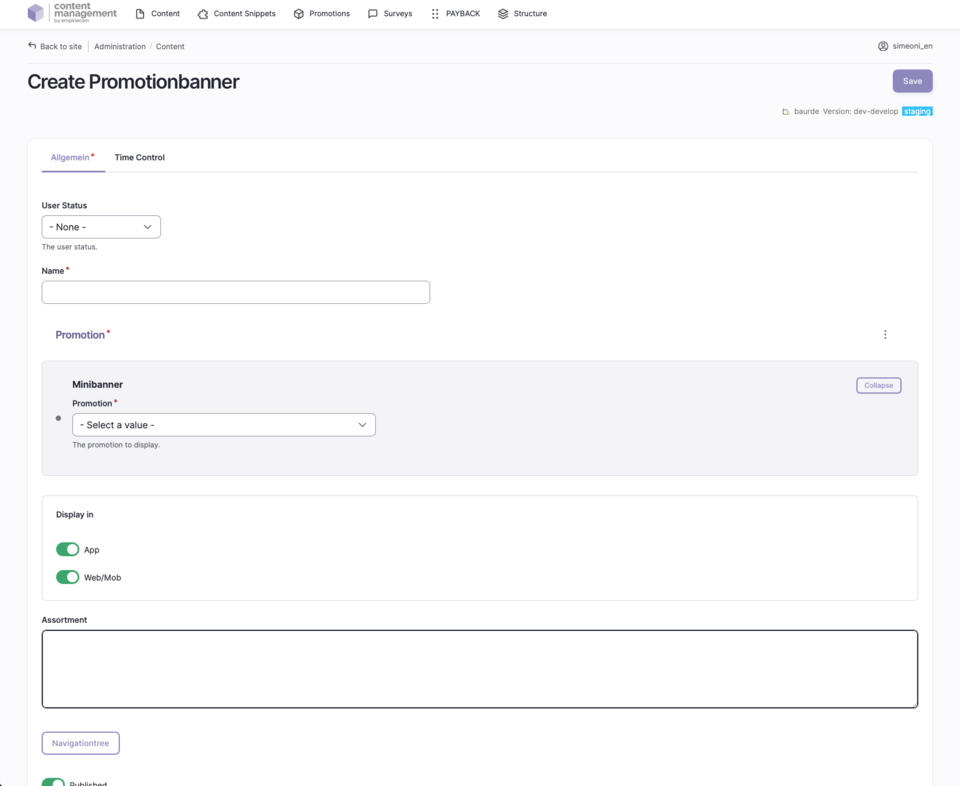
- Creation and maintenance centrally in the CMS as a separate content snippet
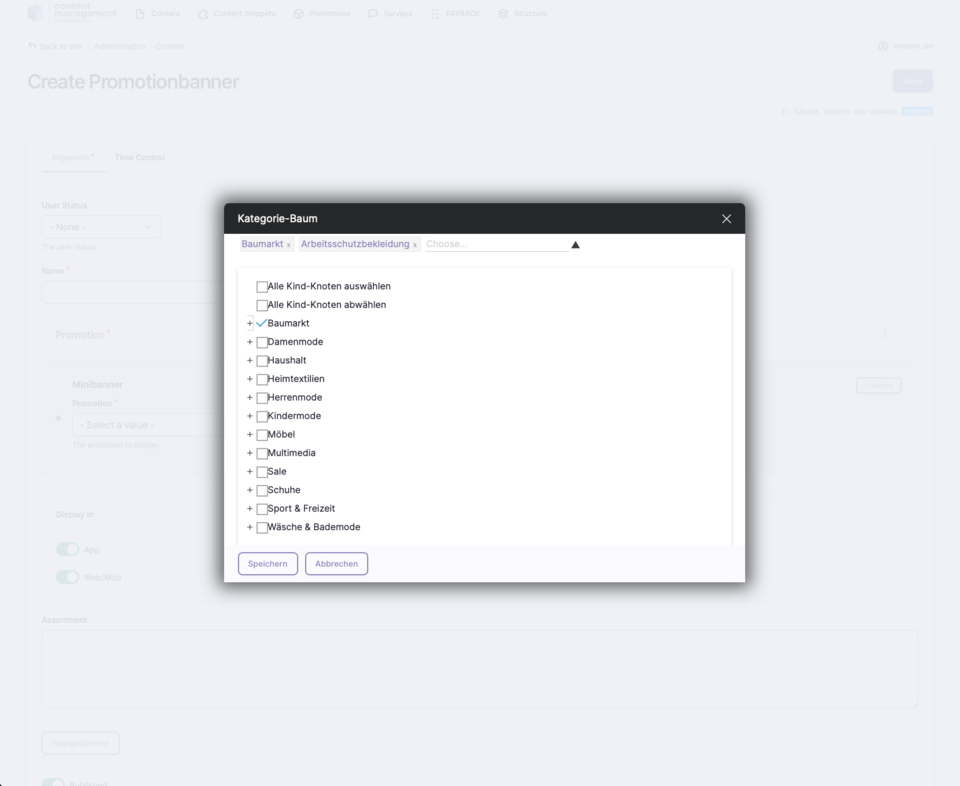
- Assignment to categories/assortments via selection in the category tree (Storefront = -1)
- Selection of the promotion in the dropdown from previously created promotions
- Target group control via the “User Status” field (anonymous, bonusProgram, logged in)
- Overview of all promotion snippets in the section “Content → Content Snippet Bundle”
- New promotion snippets can be created via “Add Promotion Banner”
- Existing promotion snippets can be cloned to quickly create new variants
Fields to fill in when creating a Promotions snippet
| Field | Description |
|---|---|
Name | Name of the content snippet (for overview in the CMS) |
Promotion | Selection of the previously created promotion in the system (dropdown) |
Assortment | Assign categories or storefront (Storefront = -1, multiple values separated by commas) |
User Status | Target group: anonymous (new customer), bonusProgram (bonus program), logged in (customer) |
Revision Log | Message/note for creation, update, etc. |
Status | Published = online, Unpublished = offline |
Additional settings and notes
- Category tree: Selection of categories is done via a modal box (“NAVIGATIONTREE”), multiple selection possible.
- URL parameters: Promotions can be specifically activated via URL parameters (e.g., ?BonusNumber=12345).
- Timing: Promotions are not published immediately after saving, but are published every 2 hours (from 8:00 a.m., runtime approx. 30–40 minutes).
- Permissions: The “Content Snippet Editor” role is required to create promotion snippets.
- Cloning: Existing promotions can be cloned to quickly create new variants.