

CS Notifications
The “Notifications” content snippet is used for the central management of notices and informational texts in the CMS. Editors can create individual texts and assign them a unique ID. Other services specifically access these contents via this ID and integrate them contextually, for example, to display additional information during checkout. Notifications are not displayed automatically but must be explicitly called by a connected service.

Use cases for the Notifications snippet
- Central management of notices and informational texts for various scenarios (e.g., checkout processes)
- Contextual integration of notifications by external services (e.g., domain order)
- Individual notices for promotions, compliance, privacy policy, legal notice, cookie notice
Management and creation of the Notifications snippet
- Creation and maintenance centrally in the CMS as a separate content snippet
- Each notification text receives a unique ID (“tag” in Drupal), which is used for targeted integration
- Overview of all notifications snippets in the section “Content → Content Snippet Bundle”
- New notifications can be created via “Add Notification”
- Existing notifications can be cloned to quickly create new variants
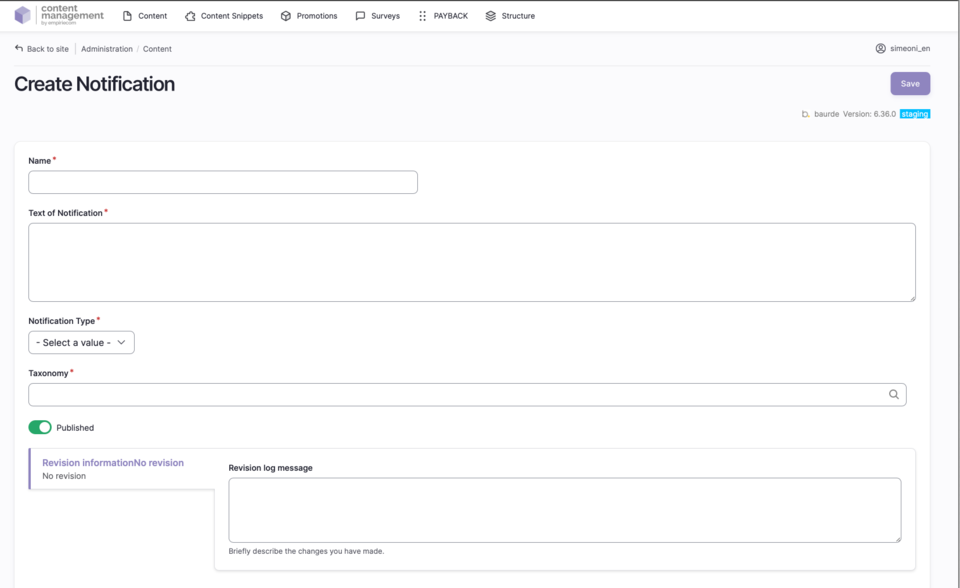
Fields to fill in when creating a Notifications snippet
| Field | Description |
|---|---|
Name | Name of the content snippet (for overview) |
Text of Notification | The notice or informational text to be displayed |
Notification Type | Select the color/type of the notification (Error, Info, Success, Warning) |
Taxonomy | Unique ID that controls the display and management of the notification |
Status | Published = online, Unpublished = offline |